

YOKOHAMA (Señor Tomato) – We get a sunny day every once in a while, although the rainy season isn’t over. This is the season when we see hydrangeas here and there. They are quite beautiful, especially the purple ones.

Señor Tomato
|

Señor Tomato
|
Well, I’m ready to annouce a new macOS software title. This new release is called Quick Sub 2. Right, it’s an upgraded version of Quick Sub.
What’s New?
- It’s developed with the SwiftUI framework from a scratch.
- The application now allows you to create rectangle-type subtitle objects.
- You can rescale subtitle objects between 0.1x and 10x in the timeline view at the bottom.
- You can move a subtitle object in the timeline view left and right to change the corresponding start time.
- You can position a subtitle object right over the movie screen with your mouse pointer.
- You can rotate the selected subtitle object.
- The application now supports undo and redo stacks.
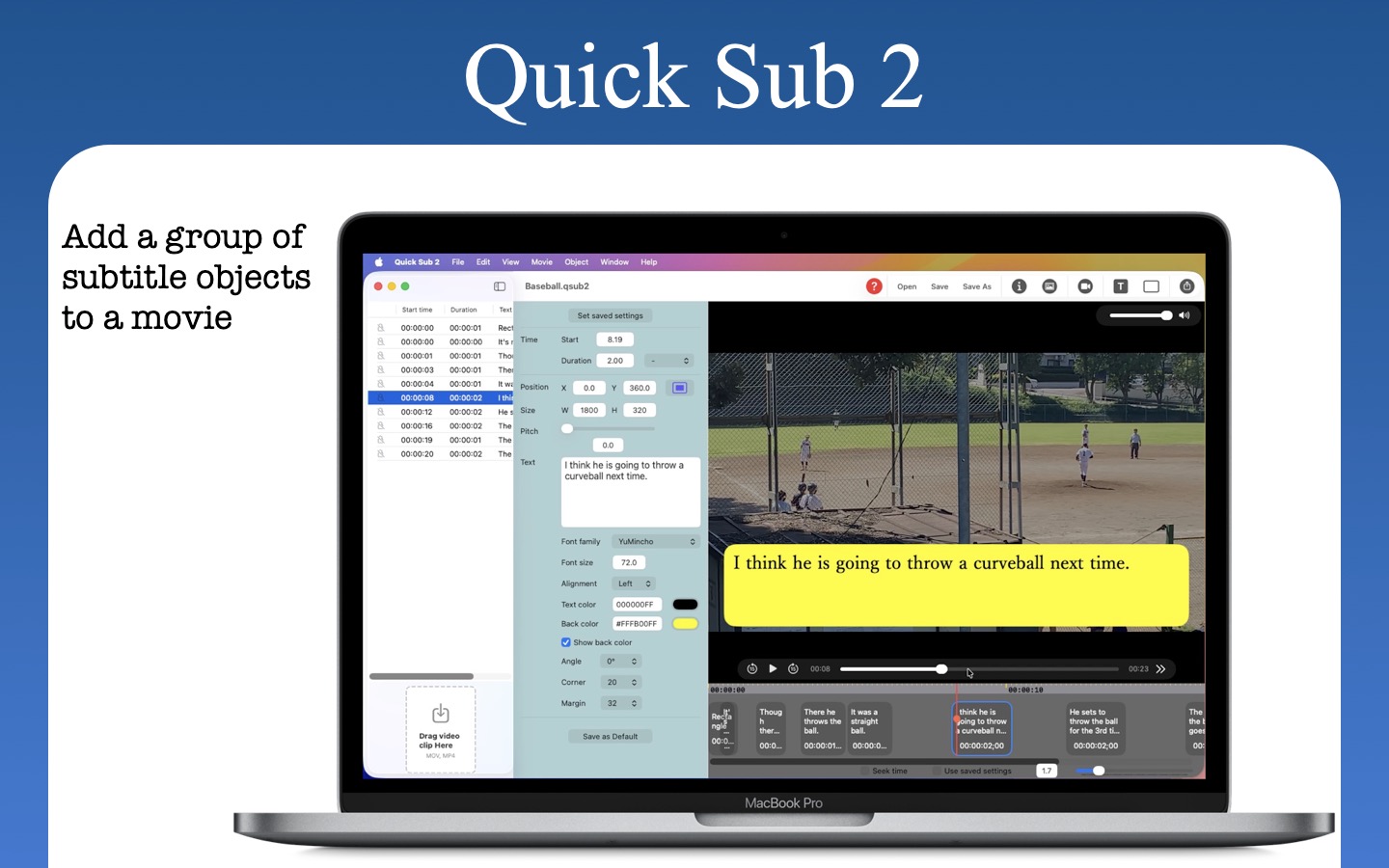
The objective of Quick Sub 2 remains the same. Quick Sub 2 lets you add a group of subtitle objects over a video clip (.MOV, .MP4) you select. You now have two different subtitle objects: Text and Rectangle. If you select the text type, you have total control over its font family, text size, text color, text alignment, and pitch height. Quick Sub 2 separates the text part from its container so that you can set the margin between them. You also have control over the container background color, corner radius, and angle.
An oops happens along the way. So Quick Sub 2 now supports the undo manager, allowing you to undo and redo changes in most actions. If you want to apply the same size (width and height) of the selected text-type subtitle object to others, you are just one menu command selection away.
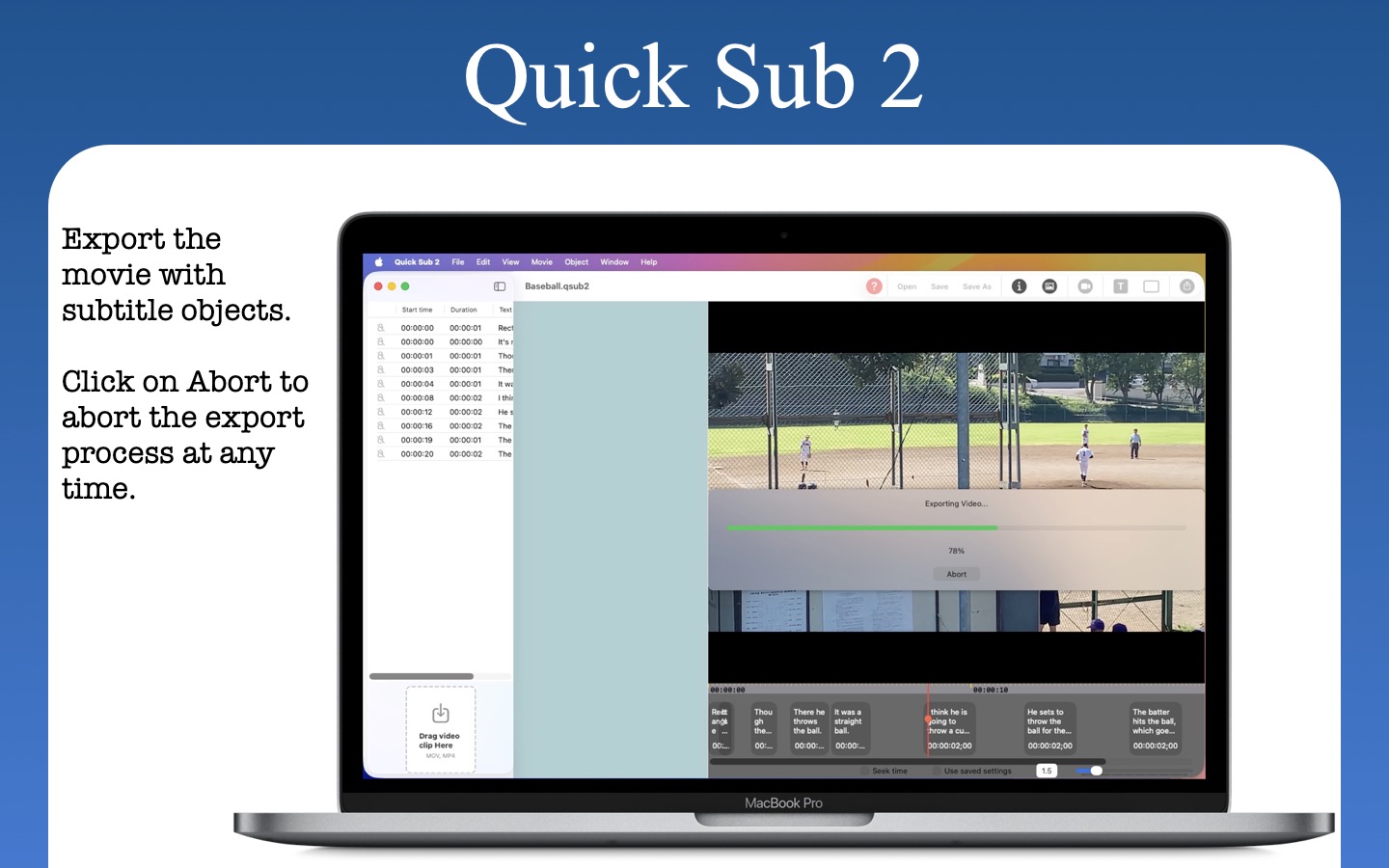
When you finish working on subtitle objects, simply click on the export toolbar button. Quick Sub 2 will show progress while writing a final movie file to disk. If necessary, click on the Abort button to stop the export process.
If you have dozens of subtitle objects, it will be impossible to replicate the same line of progress once you quit the application. Fortunately, Quick Sub 2 lets you save progress with a file type of its own (qsub2). Just double-click on a file of this type or drag and drop a file onto the application icon in the Dock to replicate progress.
Señor Tomato
|
Señor Tomato
|
System requirements
- macOS 14.0 (Universal) or higher with an Intel chip or an Apple chip (M1, M2, M3, M4, M5)
Video
Nothing so far…
Version history
Version 2.3.6 (Released on September 20th, 2026)
- Fix: Some UI changes are made under Properties View.
- Fix: The border size was not properly implemented in Circle and Rectangle objects.
- The user can now select an SF symbol from a drop-down menu that lists more than 80 objects.
Version 2.3.3 (Released on September 14th, 2026)
- Fix: There were two missing localizable strings.
- The application will now check and see if there is a new software update and will notify the user of such if there is.
- Change: With the Unlimited movie duration in-app purchase, the user will be able to export a movie of an unlimited duration with layers. Without it, the duration of an exported movie will be limited to up to 5 seconds. In order to make an in-app purchase, please click on the Store toolbar button.
Version 2.3.0 (Released on July 18th, 2026)
- Property view is further refactored for application’s integrity.
- The user can use a text file (.text) to create text layers. Choose Movie Script under Movie for this purpose.
- The user can use a subtitle file (.srt) to create text layers.
- Quick Guide is revised to explain how to use a text file and a subtitle file to create subtitle text layers.
- When the user opens a video clip, the application will show a spinner while the video is being loaded.
- Fix: When the user creates a layer object with default settings, the application could hang and crash, if the current movie screen is smaller than the size of the default layer.
Version 2.2.8 (Released on July 15th, 2026)
- When the user changed the font family of the text layer and then undo or redo the change, the font family drop-down menu was not updated.
- Fix: When the user exported the final video with layer objects including Rectangle and SF Symbol, they might have appeared from the beginning to the end.
Version 2.2.6 (Released on July 10th, 2026)
- Fix: The user was able to select a contextual menu without selecting layer in the sidebar.
- Fix: When the user clicked on the circle object tool button or symbol object tool button with the User saved settings on, the application did not apply saved settings to new layers.
- Change: The application now lets the user edit text with a multi-line text editor with Clear and Submit buttons.
- The application now disables all toolbar buttons while opening a saved document.
Version 2.2.3 (Released on July 9th, 2026)
- The application may have exported only the first 5 seconds of the video.
- Fix: The application could crash depending on the container size relative to video’s natural size.
- The seek time checkbox button could remain disabled after selecting a video clip to work with.
- The Use saved settings checkbox button could remain disabled after selecting a video clip to work with.
Version 2.2.0 (Released on July 6th, 2026)
- The user can now choose Movie > Export Subtitle to make a subtitle file (.srt) out of text layers.
- Fix: All menu commands under Object were misaligned due to a previous update.
- The user can now use a saved project file as a preset file. For this purpose, choose Open Project As Settings under File.
- The user can now use the arrow keys (up, down, left, right) to move the selected layer.
- The Timeline layer will snap to it if it’s near the beginning of the frame.
- Quick Guide is revised for these new features.
- When the user selects an application file to restore progress and the application cannot find the original video file, it will request the user to select the original file.
Version 2.1.1 (Released on July 2nd, 2026)
- Fix: The user can now smoothly move a layer over the movie canvas with their mouse pointer.
Version 2.1.0 (Released on June 30th, 2026)
- Change: The Info panel now shows the path to the current video clip.
- Fix: When the user selected a a color, the application failed to update its hex color with the pound symbol.
- The user can now create a circle layer by clicking on the corresponding toolbar button.
- The user can now create a layer with an SF symbol by clicking on the corresponding toolbar button.
This application does not collect privacy data from its users. It does not share any type of data with a third party.
Apps made available through the App Store are licensed, not sold, to you. Your license to each App is subject to your prior acceptance of either this Licensed Application End User License Agreement (“Standard EULA”), or a custom end user license agreement between you and the Application Provider (“Custom EULA”), if one is provided. Your license to any Apple App under this Standard EULA or Custom EULA is granted by Apple, and your license to any Third Party App under this Standard EULA or Custom EULA is granted by the Application Provider of that Third Party App. Any App that is subject to this Standard EULA is referred to herein as the “Licensed Application.” The Application Provider or Apple as applicable (“Licensor”) reserves all rights in and to the Licensed Application not expressly granted to you under this Standard EULA.
a. Scope of License: Licensor grants to you a nontransferable license to use the Licensed Application on any Apple-branded products that you own or control and as permitted by the Usage Rules. The terms of this Standard EULA will govern any content, materials, or services accessible from or purchased within the Licensed Application as well as upgrades provided by Licensor that replace or supplement the original Licensed Application, unless such upgrade is accompanied by a Custom EULA. Except as provided in the Usage Rules, you may not distribute or make the Licensed Application available over a network where it could be used by multiple devices at the same time. You may not transfer, redistribute or sublicense the Licensed Application and, if you sell your Apple Device to a third party, you must remove the Licensed Application from the Apple Device before doing so. You may not copy (except as permitted by this license and the Usage Rules), reverse-engineer, disassemble, attempt to derive the source code of, modify, or create derivative works of the Licensed Application, any updates, or any part thereof (except as and only to the extent that any foregoing restriction is prohibited by applicable law or to the extent as may be permitted by the licensing terms governing use of any open-sourced components included with the Licensed Application).
b. Consent to Use of Data: You agree that Licensor may collect and use technical data and related information—including but not limited to technical information about your device, system and application software, and peripherals—that is gathered periodically to facilitate the provision of software updates, product support, and other services to you (if any) related to the Licensed Application. Licensor may use this information, as long as it is in a form that does not personally identify you, to improve its products or to provide services or technologies to you.
c. Termination. This Standard EULA is effective until terminated by you or Licensor. Your rights under this Standard EULA will terminate automatically if you fail to comply with any of its terms.
d. External Services. The Licensed Application may enable access to Licensor’s and/or third-party services and websites (collectively and individually, “External Services”). You agree to use the External Services at your sole risk. Licensor is not responsible for examining or evaluating the content or accuracy of any third-party External Services, and shall not be liable for any such third-party External Services. Data displayed by any Licensed Application or External Service, including but not limited to financial, medical and location information, is for general informational purposes only and is not guaranteed by Licensor or its agents. You will not use the External Services in any manner that is inconsistent with the terms of this Standard EULA or that infringes the intellectual property rights of Licensor or any third party. You agree not to use the External Services to harass, abuse, stalk, threaten or defame any person or entity, and that Licensor is not responsible for any such use. External Services may not be available in all languages or in your Home Country, and may not be appropriate or available for use in any particular location. To the extent you choose to use such External Services, you are solely responsible for compliance with any applicable laws. Licensor reserves the right to change, suspend, remove, disable or impose access restrictions or limits on any External Services at any time without notice or liability to you.
e. NO WARRANTY: YOU EXPRESSLY ACKNOWLEDGE AND AGREE THAT USE OF THE LICENSED APPLICATION IS AT YOUR SOLE RISK. TO THE MAXIMUM EXTENT PERMITTED BY APPLICABLE LAW, THE LICENSED APPLICATION AND ANY SERVICES PERFORMED OR PROVIDED BY THE LICENSED APPLICATION ARE PROVIDED “AS IS” AND “AS AVAILABLE,” WITH ALL FAULTS AND WITHOUT WARRANTY OF ANY KIND, AND LICENSOR HEREBY DISCLAIMS ALL WARRANTIES AND CONDITIONS WITH RESPECT TO THE LICENSED APPLICATION AND ANY SERVICES, EITHER EXPRESS, IMPLIED, OR STATUTORY, INCLUDING, BUT NOT LIMITED TO, THE IMPLIED WARRANTIES AND/OR CONDITIONS OF MERCHANTABILITY, OF SATISFACTORY QUALITY, OF FITNESS FOR A PARTICULAR PURPOSE, OF ACCURACY, OF QUIET ENJOYMENT, AND OF NONINFRINGEMENT OF THIRD-PARTY RIGHTS. NO ORAL OR WRITTEN INFORMATION OR ADVICE GIVEN BY LICENSOR OR ITS AUTHORIZED REPRESENTATIVE SHALL CREATE A WARRANTY. SHOULD THE LICENSED APPLICATION OR SERVICES PROVE DEFECTIVE, YOU ASSUME THE ENTIRE COST OF ALL NECESSARY SERVICING, REPAIR, OR CORRECTION. SOME JURISDICTIONS DO NOT ALLOW THE EXCLUSION OF IMPLIED WARRANTIES OR LIMITATIONS ON APPLICABLE STATUTORY RIGHTS OF A CONSUMER, SO THE ABOVE EXCLUSION AND LIMITATIONS MAY NOT APPLY TO YOU.
f. Limitation of Liability. TO THE EXTENT NOT PROHIBITED BY LAW, IN NO EVENT SHALL LICENSOR BE LIABLE FOR PERSONAL INJURY OR ANY INCIDENTAL, SPECIAL, INDIRECT, OR CONSEQUENTIAL DAMAGES WHATSOEVER, INCLUDING, WITHOUT LIMITATION, DAMAGES FOR LOSS OF PROFITS, LOSS OF DATA, BUSINESS INTERRUPTION, OR ANY OTHER COMMERCIAL DAMAGES OR LOSSES, ARISING OUT OF OR RELATED TO YOUR USE OF OR INABILITY TO USE THE LICENSED APPLICATION, HOWEVER CAUSED, REGARDLESS OF THE THEORY OF LIABILITY (CONTRACT, TORT, OR OTHERWISE) AND EVEN IF LICENSOR HAS BEEN ADVISED OF THE POSSIBILITY OF SUCH DAMAGES. SOME JURISDICTIONS DO NOT ALLOW THE LIMITATION OF LIABILITY FOR PERSONAL INJURY, OR OF INCIDENTAL OR CONSEQUENTIAL DAMAGES, SO THIS LIMITATION MAY NOT APPLY TO YOU. In no event shall Licensor’s total liability to you for all damages (other than as may be required by applicable law in cases involving personal injury) exceed the amount of fifty dollars ($50.00). The foregoing limitations will apply even if the above stated remedy fails of its essential purpose.
g. You may not use or otherwise export or re-export the Licensed Application except as authorized by United States law and the laws of the jurisdiction in which the Licensed Application was obtained. In particular, but without limitation, the Licensed Application may not be exported or re-exported (a) into any U.S.-embargoed countries or (b) to anyone on the U.S. Treasury Department’s Specially Designated Nationals List or the U.S. Department of Commerce Denied Persons List or Entity List. By using the Licensed Application, you represent and warrant that you are not located in any such country or on any such list. You also agree that you will not use these products for any purposes prohibited by United States law, including, without limitation, the development, design, manufacture, or production of nuclear, missile, or chemical or biological weapons.
h. The Licensed Application and related documentation are “Commercial Items”, as that term is defined at 48 C.F.R. §2.101, consisting of “Commercial Computer Software” and “Commercial Computer Software Documentation”, as such terms are used in 48 C.F.R. §12.212 or 48 C.F.R. §227.7202, as applicable. Consistent with 48 C.F.R. §12.212 or 48 C.F.R. §227.7202-1 through 227.7202-4, as applicable, the Commercial Computer Software and Commercial Computer Software Documentation are being licensed to U.S. Government end users (a) only as Commercial Items and (b) with only those rights as are granted to all other end users pursuant to the terms and conditions herein. Unpublished-rights reserved under the copyright laws of the United States.
i. Except to the extent expressly provided in the following paragraph, this Agreement and the relationship between you and Apple shall be governed by the laws of the State of California, excluding its conflicts of law provisions. You and Apple agree to submit to the personal and exclusive jurisdiction of the courts located within the county of Santa Clara, California, to resolve any dispute or claim arising from this Agreement. If (a) you are not a U.S. citizen; (b) you do not reside in the U.S.; (c) you are not accessing the Service from the U.S.; and (d) you are a citizen of one of the countries identified below, you hereby agree that any dispute or claim arising from this Agreement shall be governed by the applicable law set forth below, without regard to any conflict of law provisions, and you hereby irrevocably submit to the non-exclusive jurisdiction of the courts located in the state, province or country identified below whose law governs:
If you are a citizen of any European Union country or Switzerland, Norway or Iceland, the governing law and forum shall be the laws and courts of your usual place of residence.
j. The full use of this application involves one in-app purchase. It is unlocked when you launch the application for the first time. And you can use this application with free of charge for one week without restrictions. You will not be billed during this period. Continuous use of this application requires a one-time purchase of an IAP product titled ‘Unlimited.’ The price for the IAP product is stated at Mac App Store and may change over time. Once you make a purchase, your payment will be non-refundable.
Quick Sub 2 – Subtitle Movie is a product of Tomato Software.
Apple and the Apple logo are trademarks of Apple Inc., registered in the U.S. and other countries. Mac App Store is a service mark of Apple Inc.