Burnout Paradise: The Ultimate Box with Boot Camp – Burnout Paradise: The Ultimate Box Game Play Video Part II – 18 Minutes

BurnOut Paradise: The Ultimate Box Mac Boot Camp

Burnout Paradise: The Ultimate Box is one of the latest games released by Electronic Arts. It was released in February 5th. The Burnout Paradise series was developed by Criterion Games. The first game, Burnout Paradise, was released for PlayStation 3 and Xbox 360 on January 22, 2008. Burnout Paradise: The Ultimate Box is a special edition for PCs. It contains Burnout Paradise, Burnout Paradise Cagney, Burnout Paradise Bikes and Burnout Paradise Party.

BurnOut Paradise: The Ultimate Box Mac Boot Camp BurnOut Paradise: The Ultimate Box Mac Boot Camp

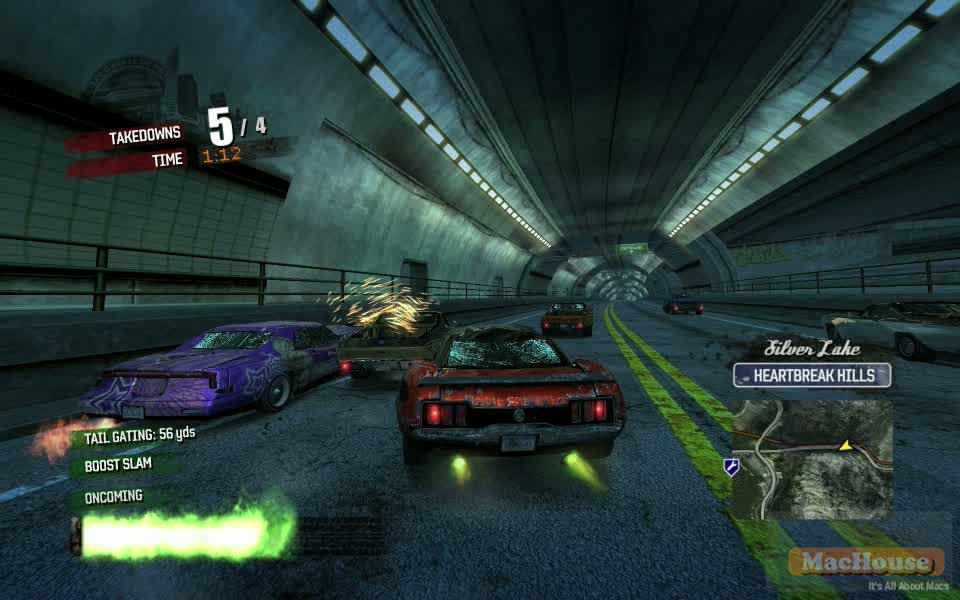
The following is another game play video from Paradise Cars. The car that I’m driving is HUNTER VEGAS. And I will get my driver’s license upgraded to Class B at the very end of the game play video.

By the way, what will happen if you get your driver’s license upgraded to Class A? Well… You will be entitled to going for BurnOut License for more wins.   Continue reading

Burnout Paradise: The Ultimate Box with Boot Camp – Burnout Paradise: The Ultimate Box Game Play Video Part I – 34 Minutes

BurnOut Paradise: The Ultimate Box Mac Boot Camp

Burnout Paradise: The Ultimate Box is one of the latest games released by Electronic Arts. It was released in February 5th. The Burnout Paradise series was developed by Criterion Games. The first game, Burnout Paradise, was released for PlayStation 3 and Xbox 360 on January 22, 2008. Burnout Paradise: The Ultimate Box is a special edition for PCs. It contains Burnout Paradise, Burnout Paradise Cagney, Burnout Paradise Bikes and Burnout Paradise Party.

BurnOut Paradise: The Ultimate Box Mac Boot Camp BurnOut Paradise: The Ultimate Box Mac Boot Camp

So what kind of game is Burnout Paradise? It’s a racing game in which you get to drive cars and motorcycles around Paradise City. You can switch vehicles at a junk yard. Stop your vehicle at a specific intersection to take a challenge. If you win, your driver’s license may be upgraded.

BurnOut Paradise: The Ultimate Box Mac Boot Camp BurnOut Paradise: The Ultimate Box Mac Boot Camp

By the way, it’s a kind reminder that the game application is a bit unstable. The game screen froze at least three times when I tried to play the game. And I was forced to restart the computer in each occasion.   Continue reading

Video Tutorial: Making Desktop Video with ScreenFlow – 05

Mac software Telestream ScreenFlow

Video Tutorial: Making Desktop Video with ScreenFlow – 05: Transition Effect

Let’s see what we have done so far. We recorded a desktop movie based on an existing PayPal phishing website. We then placed several Callout objects. In this video tutorial, we have three objectives.

Adding an introduction movie
Creating a custom transition effect
Adding an audio clip

ScreenFlow allows users to import video clips. That’s nice. But ScreenFlow doesn’t come with transition effects that are used to connect two separate videos. So we want to create a simple transition effect between an introduction movie and the recorded desktop video.   Continue reading

Adobe Flash CS4: Converting QuickTime Movie into Flash H.264 – Part 3

Adobe Media Encoder CS4 Mac    Adobe Flash CS4 Mac

Adobe Flash CS4: Converting QuickTime Movie into Flash H.264: Part 3 – SWF

Using Adobe Media Encoder, we produced a movie clip that contains a video stream compressed with H.264 last time. But Flash Player cannot play back this video. We need a reference file that points to the F4V and that is accessible with Flash Player. Our ultimate goal is to create an SWF file pointing to the video clip. And we want to upload these files on a remote server so that the converted Flash video can be viewed on the Internet.   Continue reading

Adobe Flash CS4: Converting QuickTime Movie into Flash H.264 – Part 2

Adobe Media Encoder CS4 Mac    Adobe Flash CS4 Mac

Adobe Flash CS4: Converting QuickTime Movie into Flash H.264: Part 2 – H.264 Settings

Last time, we found out that installing Adobe Flash is not sufficient enough to compress a QuickTime into Flash. In the 2nd video tutorial of the series, we first go over the differences between two Flash codecs: Sorenson Spark and On2 VP6. In the meantime, our main task is to convert an existing QuickTime video into a Flash movie. So we will go over the settings of H.264 codec as well.   Continue reading