Apple Soundtrack Pro 2 Basic Training – Part 4

Soundtrack Pro video tutorial

Apple Soundtrack Pro 4 Basic Training: Part 4 – Export

Soundtrack Pro supports two main document types – Multitrack project (.stmp) and Audio file project (.stap). Choosing a wrong file type can be costly. In other words, one must choose the right file type when they start out and edit audio clips with Soundtrack Pro. Or they can end up starting over the whole thing. In the meantime, when you export a document, you might see a message window that says “The project must be flattened in order to save it as a different type.” Flatten? What does it mean?

Soundtrack Pro video tutorial   Soundtrack Pro video tutorial

We first want to see the difference between the two audio file types. We want to choose the right file type and export our audio project, which we then want to read with Final Cut Pro.   Continue reading →

Apple Soundtrack Pro 2 Basic Training – Part 3

Soundtrack Pro video tutorial

Apple Soundtrack Pro 2 Basic Training: Part 3 – Effects

In the third video tutorial of the Soundtrack Pro Basic Training series, we first import a Windows Media Audio file to Soundtrack Pro. The goal of this tutorial is to learn how to apply effects to audio tracks. And we want to change the pitch of the voice in the audio file.   Continue reading →

Tom Clancy’s HAWX with Boot Camp – Tom Clancy’s HAWX Game Play Video Part 1 – 17 Minutes

Tom Clancy's HAWX Ubisoft Mac Boot Camp

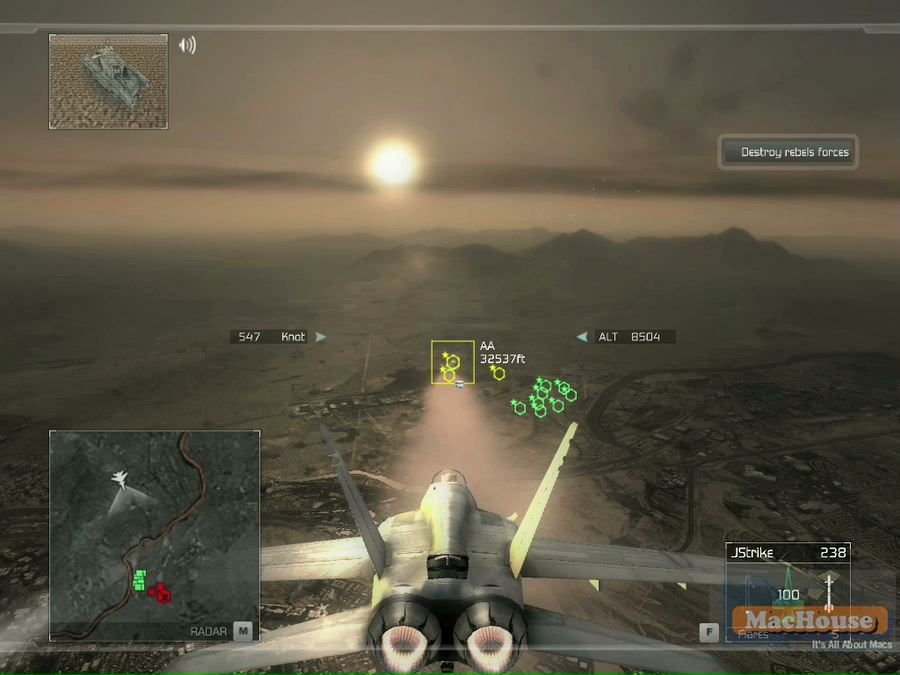
Tom Clancy’s HAWX is the latest PC game release from Ubisoft. It was developed by Ubitsoft’s game studio in Romania. Tom Clancy’s HAWX is also available for X360 and PS3. It will soon be available for Wii.

More than a month ago, Ubisoft published Tom Clancy’s EndWar. Two game titles both come with Tom Clancy’s. But Tom Clancy’s HAWX is a totally different game. It’s a real-time air combat game. And you will get to control an air combat fighter to attack land buildings/vehicles and shoot down enemy aircrafts.

Tom Clancy's HAWX Ubisoft Mac Boot Camp Tom Clancy's HAWX Ubisoft Mac Boot Camp

In this game, you will play the character of David A. Crenshaw, an Air Force major who is assigned to the 16th Fighter Squadron of Langley Air Force Base. He is an honor graduate of the U.S. Air Force Academy in 1999. In April, 2006, the Department of Defense transfers Crenshaw to High Altitude Warfare-Experimental (HAWX) squadron.   Continue reading →

Installing Mac OS X 10.5 Leopard on External Hard Disk Drive

Mac OS X Core 2 Duo 2.8 GHz 24 inch icon

We purchased a new FireWire-connected hard disk drive case yesterday. We now have four external drive cases. We notice that some people are interested in knowing whether it’s possible to install Mac OS on a particular external hard disk drive. If it’s a USB-powered disk drive, the answer is flatly no. So one necessary (but not sufficient) qualification for the drive to be used as Mac OS startup drive is having a FireWire connection port.

how to install Mac OS on external hard disk drive
Screenshot 01 –
Source: MacHouse
  how to install Mac OS on external hard disk drive
Screenshot 02 –
Source: MacHouse

So we’ve tried installing Mac OS X 10.5 on this new hard disk drive case, which has both FireWire and USB ports. It doesn’t take a 15-year Mac veteran to figure out that the first step is to insert an OS startup DVD to the computer. Then I need to use the Startup Disk pane to select the installation disc and click on the restart button. (See Screenshot 01.) The target drive is named ‘160 GB.’ When the iMac starts up on the installation disc, I see the ‘Select a Destination’ screen. We know that Mac OS can only be installed on a volume with a downward-looking, yellow-green arrow. Looking at the computer screen, it doesn’t look like we can install Mac OS X 10.5 on 160 GB. (See Screenshot 02.)   Continue reading →

マックで使える製品の紹介:玄蔵 Duo (GW3.5MX2-SIU/CB)

玄人志向 玄蔵 Duo GW3.5MX2-SIU/CB
Mac product review

アップル社が数年前からデスクトップ・コンピュータにSATA (シリアルATA) のハードディスク・ドライブを搭載していることは、ご存知だと思います。何年もマックを使っているとSATAのハードディスク・ドライブを交換することもあるかと思います。そんな時に重宝する製品がハードディスク・ケースです。ハードディスク・ケースを使うことにより、必要のなくなったハードディスク・ドライブを外付けHDとして使うということです。

さてSATAドライブに対応する最近のハードディスク・ケースの接続方式で圧倒的に多いのがUSBです。次に多いのが。。。FireWireと言いたいところですが、実際のところがeSATAのようです。アップル社はまだeSATA対応の製品をだしていないので、Mac Pro意外でeSATA接続のみのハードディスク・ケースを使うことは不可能でしょう。そしてFireWire接続のケースですが、SATAドライブ対応の製品は何故かあまりありません。そこで今回紹介するのが、玄人志向から販売されている玄蔵 (くろぞう) Duo (GW3.5MX2-SIU/CB) です。(図01参照)

玄人志向 玄蔵 Duo GW3.5MX2-SIU/CB
図01: 資料元 – マックハウス
  玄人志向 玄蔵 Duo GW3.5MX2-SIU/CB
図02: 資料元 – マックハウス

まずこの製品の簡単な特徴を紹介しておきましょう。この製品の接続方式はIEEE1394a (FireWire 400) 及び USB 2.0/1.1ですので、Mac Pro意外のコンピュータ、iMac、Mac miniでも使うことができます。そして最も目に留まる特徴が、この製品はSATAのハードディスク・ドライブを2機収納可能なことです。例えば、iMac G5 2GHzに搭載されていたWestern Digital社製の160 GBハードディスク・ドライブがあったな〜。それとこのiMac (iMac 2.8 GHz Core 2 Duo)に元々搭載されていた、これまたWestern Digital社製の320 GBのハードディスク・ドライブも使わずに放置されている。ということで、その2つの内蔵ドライブを玄蔵 Duoに収納して、FireWire接続でこのiMacに繋げてみると。。。その結果は図02にあるように、SATAドライブを個々にマウントすることができます。そして価格が安いにも関わらず、玄蔵 Duoには冷却ファンがついているので、一応の熱への対策もされています。(図03参照)FireWireポートが2機搭載されているので、デイジー・チェーンで他のFireWire製品に繋ぐことももちろん可能です。(FireWireケーブルは1つしか付属していないので注意。)  Continue reading →